Logged Packages
Logged Packages lets you search packages that have been logged for your account within a date range or a specific ship date, and export the results.
Accessing Logged Packages
In the sidebar, click Packages → Logged Packages.
Searching by Date Range
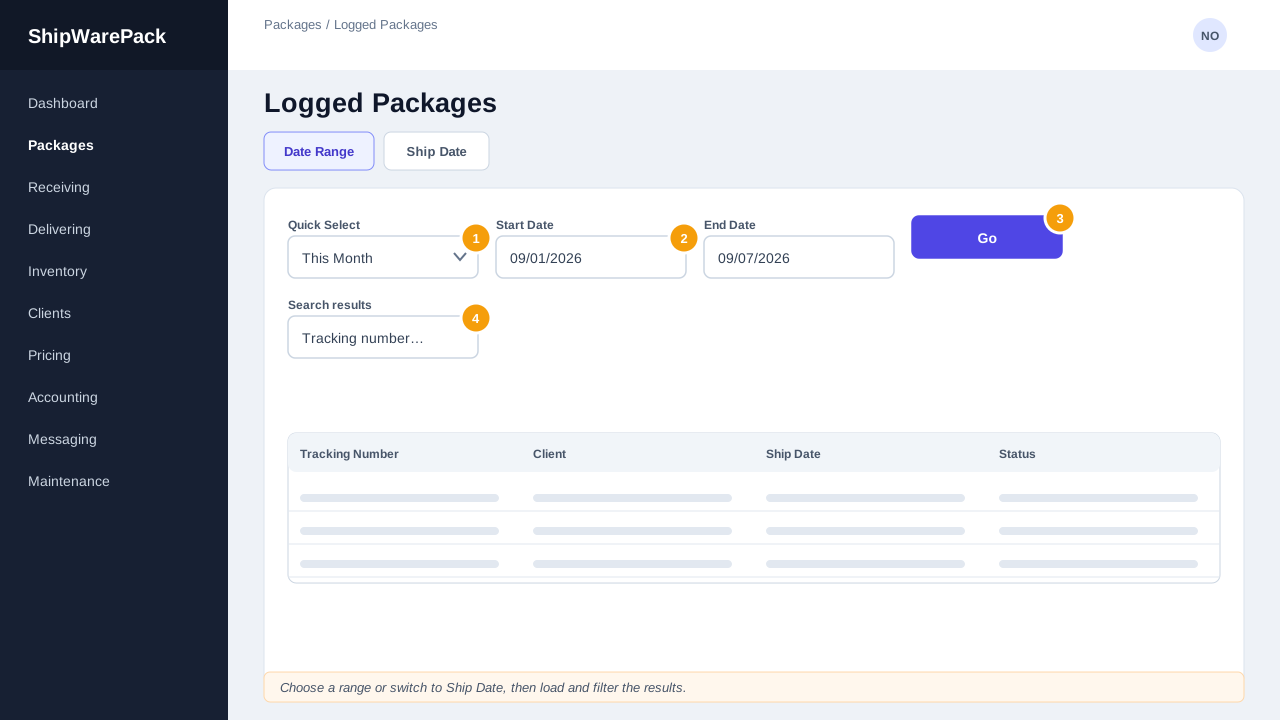
- Stay on the Date Range tab (selected by default).
- Use Quick Select to jump to a common range (Today, Yesterday, This Week, Last Week, This Month, Last Month, Last 3 Months, Last 6 Months, This Year, Last Year), or set Start Date and End Date manually.
- Click Go to load the results.
- Use the search box to filter the loaded rows further.
Searching by Ship Date
- Switch to the Ship Date tab.
- Choose a date from Select Ship Date.
- Click Go.
Exporting Results
Once a result set is loaded, use the buttons at the top of the panel:
| Button | Result |
|---|---|
| Excel | Downloads an .xlsx file with standard columns (Customer, Tracking Number, Client, Content, Shipping Method, Quantity, Weight, Ship Date, Container, Remarks, AWB) |
| CSV | Downloads a comma-separated export of the same data |
| Opens a print-ready view in a new window | |
| Customs | Downloads an .xlsx file formatted for customs paperwork (First Name, Last Name, Tracking Number, Account #, AWB #, Carrier, Weight, Contents, # Pieces, Container) |
Columns
The table includes tracking number, AWB, client ID and name, content, quantity, weight, container, shipping method, and (hidden by default, but available via the column filter) who logged the package and when.
Tip
Use the quick select dropdown for common ranges rather than typing dates by hand — it keeps the correct calendar boundaries (start/end of week, month, or year).