Receive by Date
Use Receive by Date to work through the full manifest of packages expected on a specific ship date, checking each one off as it's scanned.
Accessing Receive by Date
In the sidebar, click Packages → Receive Packages → Receive by Date.
Loading the Manifest
- Choose a date from Select Ship Date.
- Click Load Manifest.
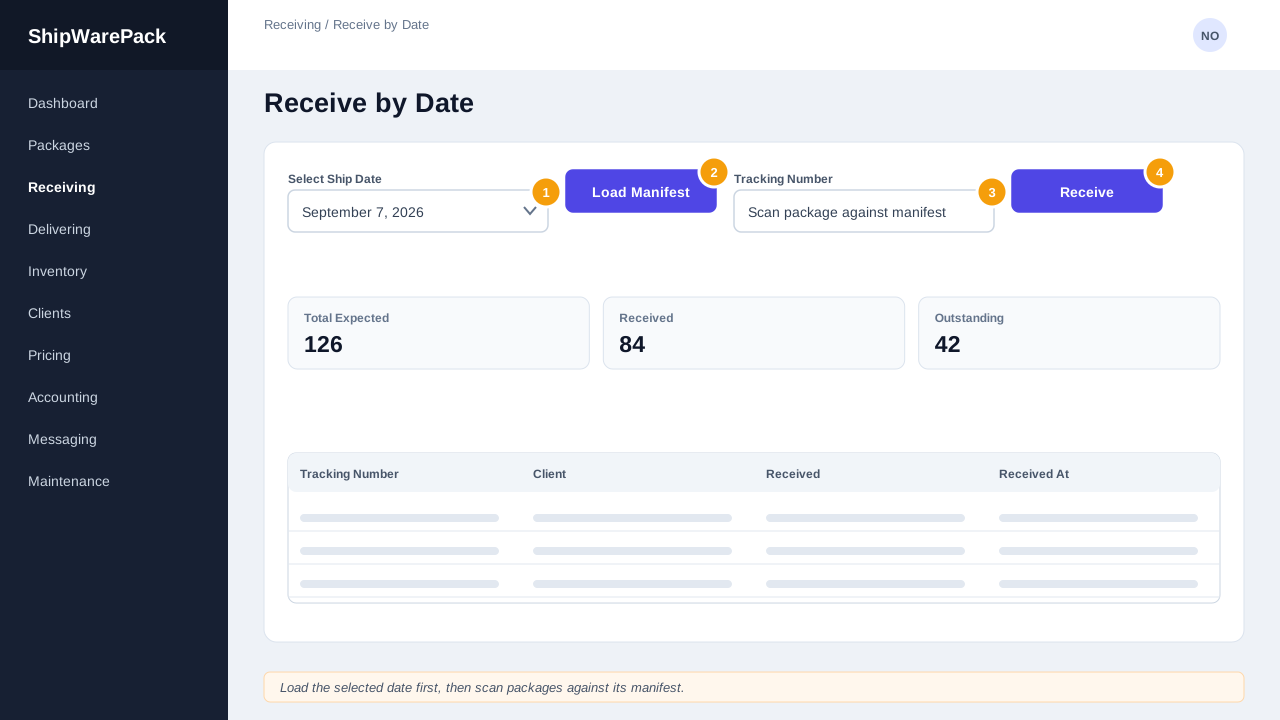
Once loaded, three statistics cards appear:
- Total Expected
- Received
- Outstanding
Scanning Against the Manifest
Use the scanner panel to scan or type tracking numbers. Each scan is checked against the loaded manifest:
- If the tracking number is on the manifest and not yet received, it's marked Received and the outstanding count drops.
- If it isn't on the manifest, it's flagged so you can investigate.
The Manifest Table
Below the scanner, the full manifest is listed with a status badge (Received / Not Received) per row, along with carrier, shipment, container, and the time each item was received. Use the search box to jump to a specific tracking number, or the badges above the table as a legend.
Tip
Load the manifest first thing when a shipment's ship date arrives, then keep this page open on a warehouse scanning station throughout the day — the Outstanding count gives you a running to-do list.